
If you're juggling three or more credit cards, the fastest and least disruptive fix is an AI-powered credit-card optimization tool, not a creditor hardship plan. Tools like Finja pull every card into one dashboard, flag which balance is bleeding you the most interest, and automate payments so nothing slips through. This is what most people searching for credit card hardship programs actually need: a way to manage several cards at once, not a distress plan with a lender.
You get the most out of this approach if you're carrying balances on two or more cards, paying APRs above 20%, or juggling due dates that never seem to line up with your paycheck. Within the first billing cycle or two, expect:
- Fewer missed or late payments because minimums are on autopay
- Lower total interest paid, since extra dollars go to your highest-APR card first
- Improved utilization, often the fastest lever for a credit-score bump
Key Takeaways
Optimizing payments across multiple credit cards with an AI tool reduces interest costs and protects your credit score more reliably than juggling due dates manually.
| Point | Details |
|---|---|
| Automate minimums first | Set autopay on every card before optimizing anything else to protect payment history. |
| Pay before statement close | A mid-cycle payment lowers reported utilization faster than waiting for the due date. |
| Keep utilization under 30% | This threshold covers roughly 30% of your FICO score weighting. |
| Know when to escalate | Debt management plans suit unmanageable balances; optimization suits active payment behavior. |
| Choose transparent tools | Finja shows the reasoning behind each recommendation and lets you override any suggestion. |
Table of Contents
- What Are Credit Card Hardship Programs (and How Does AI Optimization Differ)?
- How Do You Start Reducing Interest This Week?
- What Should You Look for in an AI Credit Card Tool?
- When Should You Consider a Debt Management Plan Instead?
- Can Optimizing Payments Hurt Your Credit Score?
- How Do the Leading AI Payment-Optimization Tools Compare?
- Do AI Tools Adjust as Your Spending Changes?
- What Mistakes Do People Make With These Tools?
- What Should You Expect in Your First 90 Days?
- Get Started With Finja's AI Credit Card Coach
- Sources
What Are Credit Card Hardship Programs (and How Does AI Optimization Differ)?
Traditional credit card hardship programs are short-term relief arrangements issuers offer people in financial distress, things like paused payments or temporary rate cuts. AI credit-card optimization tools solve a different, more common problem: you're current on your payments but spread thin across too many cards with no system for deciding what gets paid first.
The mechanics start with an aggregated dashboard that pulls in balances, APRs, due dates, and any benefit or promotional-rate expirations across every card you link. From there, an optimization engine applies avalanche-style logic, ranking your debts by interest rate and directing any extra dollars toward the account costing you the most. Some tools go further, timing a second payment mid-cycle, before your statement closes, so the balance reported to the bureaus is lower than what you'd see if you paid once, on the due date, and left the debt sitting through the whole billing cycle.
Automation stacks on top of that: minimum payments on autopay so nothing is ever late, extra-payment scheduling tied to your paycheck, and alerts when a promotional APR is about to expire or a benefit credit is going unused. Utilization matters here because it's roughly 30% of your FICO score, one of the two heaviest-weighted factors in the whole model.
- Account aggregation via secure, encrypted bank-linking (the same Plaid-style connections banks themselves use)
- Payment prioritization based on APR, not just balance size
- Mid-cycle payment scheduling to lower reported utilization
- Alerts for due dates, rate changes, and expiring benefits
Statistic Callout: Utilization sits at roughly 30% of your FICO score weighting, second only to payment history. A tool that lowers your reported balance before the statement cuts can move that number without you paying a cent more.
How Do You Start Reducing Interest This Week?
You don't need a financial advisor to start fixing this. You need thirty minutes and a list.
- Inventory everything. Write down every card, its balance, APR, due date, and any promotional rate or benefit credit that's about to expire.
- Set autopay for minimums immediately. This is the single fastest way to protect your payment history while you sort out the rest.
- Link your accounts to an AI tool, or if you're not ready for that step, put a recurring calendar reminder for a manual mid-cycle payment on your highest-balance card.
- Choose a payoff strategy. Avalanche (highest APR first) saves the most money mathematically; snowball (smallest balance first) works better for people who need momentum. Either beats no strategy.
- Schedule payments twice a month instead of once, ideally with the second payment landing before your statement closing date, not just before the due date.
- Check your utilization after 30 to 60 days and aim for under 30% aggregate. Adjust which card gets the extra payment as balances shift.
The math behind step five matters more than people realize. Making more than one payment per month, especially one that lands before the statement closes, reduces the balance that gets reported and cuts the average daily balance interest accrues against. On a $4,000 balance at 24% APR, splitting one $400 payment into two $200 payments, one mid-cycle, can shave off real interest over a year, simply because less principal sits accruing charges for fewer days.
Pro Tip: Automate the minimums on every single card first, before you touch anything else. Missing one payment while you're optimizing the other four does more credit damage than a slightly inefficient payoff order ever will.
Consistent automation of minimum payments, paired with manually directed extra payments toward your worst-APR card, is the pattern that protects your score while actually shrinking your debt. For a deeper breakdown of specific tactics, Finja's guide on reducing credit card bills covers additional angles worth layering in.
What Should You Look for in an AI Credit Card Tool?
Not every app that promises to "optimize" your cards deserves your bank credentials. Run any candidate through this checklist before you link a single account.
- Security first: it should use bank-grade encrypted linking (the same infrastructure major banks rely on) and never ask you to type in a full card number or online banking password directly into a chat window.
- Read the privacy policy for one specific thing: whether your transaction data is sold to third parties or used only to power your own recommendations.
- Core features, non-negotiable: multi-card aggregation, automated payment scheduling, an actual optimization engine (not just a spending tracker), benefit and promo-rate tracking, and a manual override for any recommendation.
- Usability: a dashboard you can read in ten seconds, real alerts (not just a weekly email digest), and support you can reach if something goes wrong.
- Business model transparency: clear pricing, an honest trial period, and no forced annual commitment buried in fine print.
Red flags worth walking away from: a tool that asks for your full card number instead of using secure bank linking, a support channel that never answers, or an app that executes payments with zero option to review or override its own suggestion before it goes through.
When Should You Consider a Debt Management Plan Instead?
AI optimization is powerful for people who can pay their balances in full over time, it's a payment-behavior tool, not a debt-restructuring tool. If your total balances have grown past what any optimization strategy can realistically chip away at, a different solution is worth considering.
- Debt management plans (DMPs) through a nonprofit credit counseling agency restructure multiple accounts into one negotiated payment over three to five years, typically with lower rates but also fees and, often, closed accounts.
- Balance transfer cards can pause interest accrual for 12 to 21 months, but watch the transfer fee (usually 3 to 5%) and what the rate reverts to afterward.
- Consolidation loans trade revolving debt for a fixed installment loan, useful if you want a firm payoff date, though approval depends on your credit and income.
- Credit counseling is worth a call if you can't cover even reduced minimums across your cards, that's a different problem than needing better payment prioritization.
Short-term issuer relief is meant to be temporary, while DMPs and consolidation are multi-year commitments with real costs. If you're weighing that route, Debt Recovery Hub's consolidation resources walk through the tradeoffs in more depth, and Finja's payment plan breakdown is a useful next stop before you commit to one path.
Can Optimizing Payments Hurt Your Credit Score?
Used carelessly, yes, in small ways. Utilization drives roughly 30% of your FICO score, so paying down balances before your statement closes almost always helps. But a few pitfalls deserve attention.
- Closing a card once it's paid off can shrink your total available credit and raise your utilization ratio on the remaining cards. Canceling old cards often does more harm than good.
- Balance transfer fees and expiring promotional rates can quietly erase savings if you don't track the calendar.
- Keep some available credit open on every card rather than maxing one out while paying another to zero.
- Confirm every automated payment actually posted. A glitch that skips a payment is a late mark you didn't see coming.
How Do the Leading AI Payment-Optimization Tools Compare?
Pricing, support quality, and how the recommendation engine actually behaves are the three things worth comparing before you commit. Most tools in this category follow a freemium structure: a free tier that aggregates your cards and shows utilization, with a paid tier unlocking automated optimization, benefit tracking, and priority support.
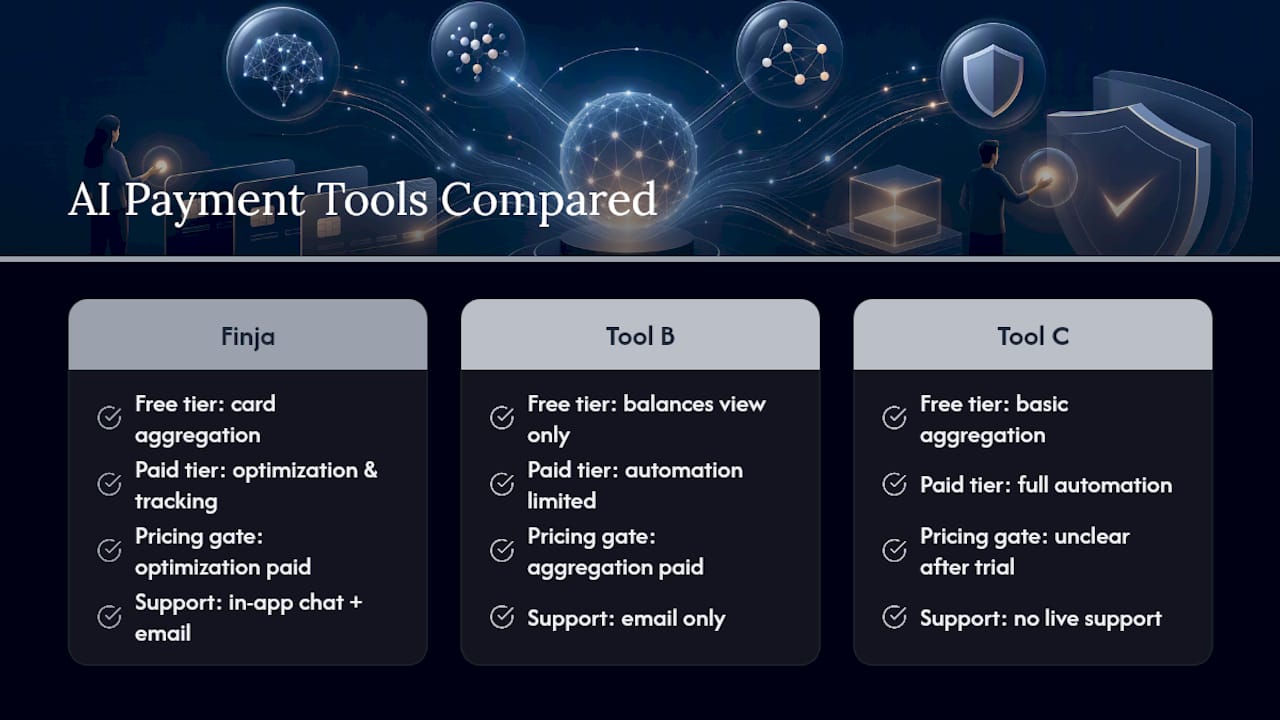
On pricing, look past the headline number and check what's gated behind the paywall. A tool that charges for basic account aggregation but gives away the optimization engine is backward, the aggregation is commodity technology at this point; the optimization logic is where the real value sits. Finja's structure puts payment prioritization and mid-cycle scheduling in the paid tier because that's the feature actually reducing your interest bill, not a fee for viewing balances you could already see in your banking apps.
Support quality varies more than people expect. A tool with no live support option becomes a liability the moment autopay misfires or a linked account disconnects. Look for in-app chat or email support with a stated response window, not just a help-center article.
User reviews cluster around two complaints across this category: unclear pricing after the trial ends, and recommendations that felt like a black box with no way to see the reasoning. Any tool worth paying for should show you why it's suggesting a payment, not just tell you to make it. That transparency is also your best defense against the "model inaccuracy" risk inherent to any automated recommendation engine, being able to see and override the logic is what keeps you in control.
Do AI Tools Adjust as Your Spending Changes?
A static payoff plan goes stale the moment your spending shifts, a bigger grocery bill one month, an unexpected repair the next. The better optimization engines recalculate continuously rather than locking in a plan on day one and letting it run.
That means the recommendation engine reweights which card gets your extra payment as balances and APRs shift relative to each other. If you pay off your highest-rate card and a second card becomes the new leader in interest cost, the tool should redirect extra payments there automatically, without you having to notice and manually reassign anything.
The same logic applies to spending pattern changes. If your monthly spend jumps on one card, whether due to a seasonal expense or a new subscription, the system should flag that the projected balance and utilization are trending upward before your statement even closes, giving you a chance to adjust rather than getting surprised by the number after the fact.
This adaptive layer is also where benefit tracking earns its keep. Premium cards often carry credits, streaming reimbursements, travel credits, that go unused simply because nobody's tracking expiration dates across four or five accounts. Fragmentation like that can cost cardholders several hundred dollars a year in unclaimed benefits, and it's exactly the kind of blind spot a continuously updating dashboard is built to catch.

What Mistakes Do People Make With These Tools?
The biggest mistake is treating the tool's first recommendation as gospel and never checking back in. Optimization engines work off the data you've given them, if a payment gets disputed, a merchant issues a refund, or you put a temporary hold on a card, the system needs a way to log that exception. A trustworthy tool builds in manual overrides for exactly this reason; one that doesn't can trigger a payment you didn't intend or, in rare cases, contribute to an unwanted account action.

A second common error: linking accounts and then ignoring the alerts entirely. The automation handles minimums, but the real interest savings come from you reviewing the extra-payment suggestions and confirming they still make sense as your balances shift. Skipping that step turns a smart tool into a passive one.
Third, people sometimes chase full payoff speed at the expense of utilization strategy, maxing out effort on one card while letting others sit untouched near their limits. Spreading modest extra payments across your highest-APR cards, rather than obsessing over one account, usually protects your score better while still cutting interest.
What Should You Expect in Your First 90 Days?
Month one is mostly setup friction: linking accounts, correcting a due date the system misread, adjusting autopay amounts. By month three, most multi-card users see utilization drop and interest charges shrink as extra payments consistently target the right balance. The biggest early hurdle isn't the technology, it's remembering to update autopay when you change strategies.
— Grace K.
Get Started With Finja's AI Credit Card Coach
Finja pulls every card you carry into one dashboard, ranks them by what's actually costing you money, and automates the payments that move the needle: minimums on time, extra dollars toward your highest-APR balance, and a second payment scheduled before your statement closes so your reported utilization drops without you lifting a finger.
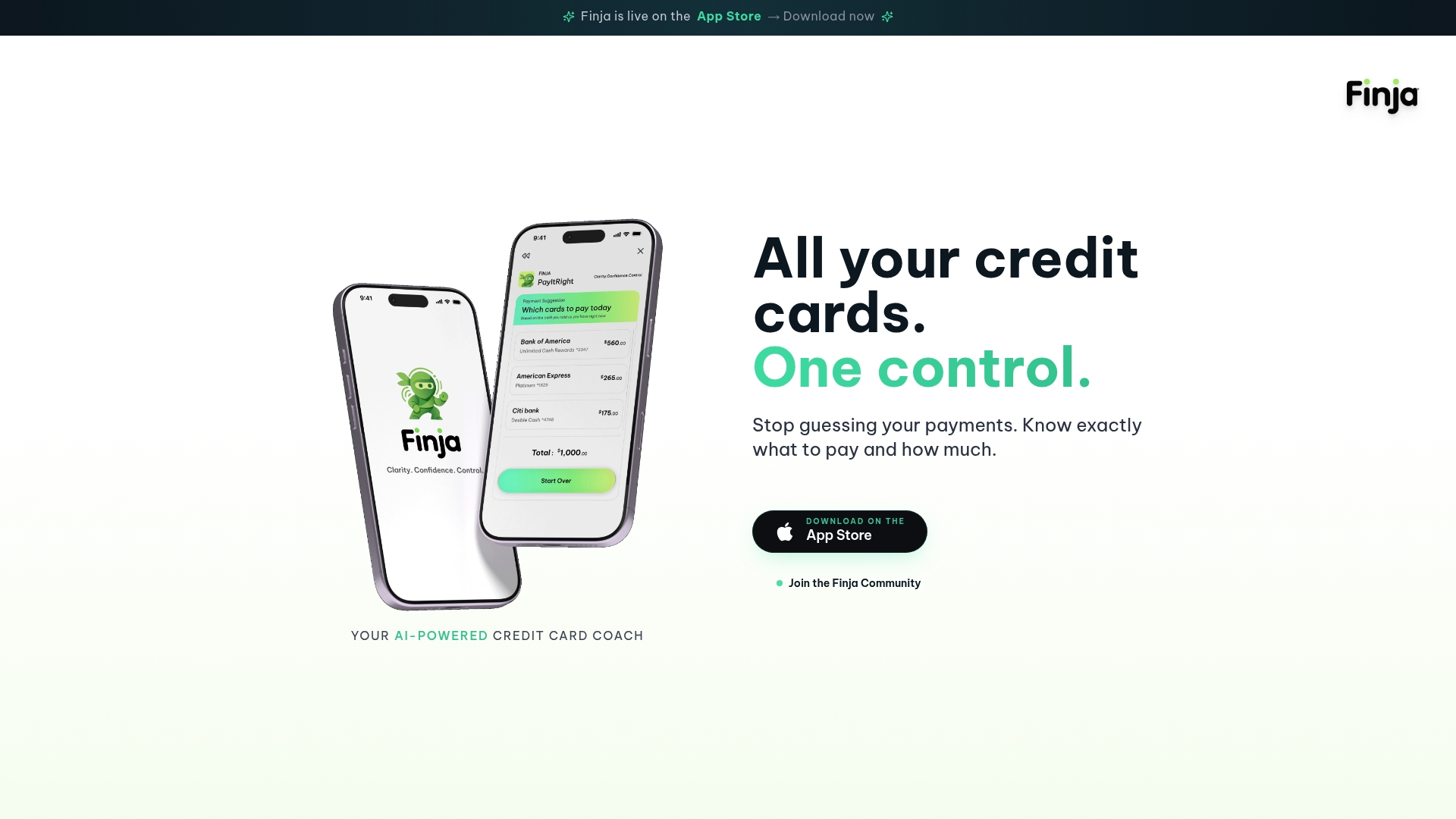
After you sign up, connecting your accounts takes a few minutes through encrypted, bank-grade linking, the same standard used across the finance apps you already trust. You'll see your combined balances, APRs, and due dates immediately, with optimization recommendations following shortly after as the system learns your payment patterns. Every recommendation comes with a manual override, so you stay in control of what actually gets paid. Finja's privacy approach keeps your data working for your own recommendations, not for sale to third parties. If you're ready to see your real utilization number and start directing payments where they'll save the most, start your free trial at Finja and link your first card today.